LWIR Thermal Camera
HERCULES adds a physics-based long-wave infrared (LWIR) thermal camera that is not present in Cosys-AirSim. Rather than false-coloring an RGB image, it renders apparent temperature from Planck-law spectral radiance, so warm bodies (wildlife, people, vehicles, fire) stand out against a cooler background.
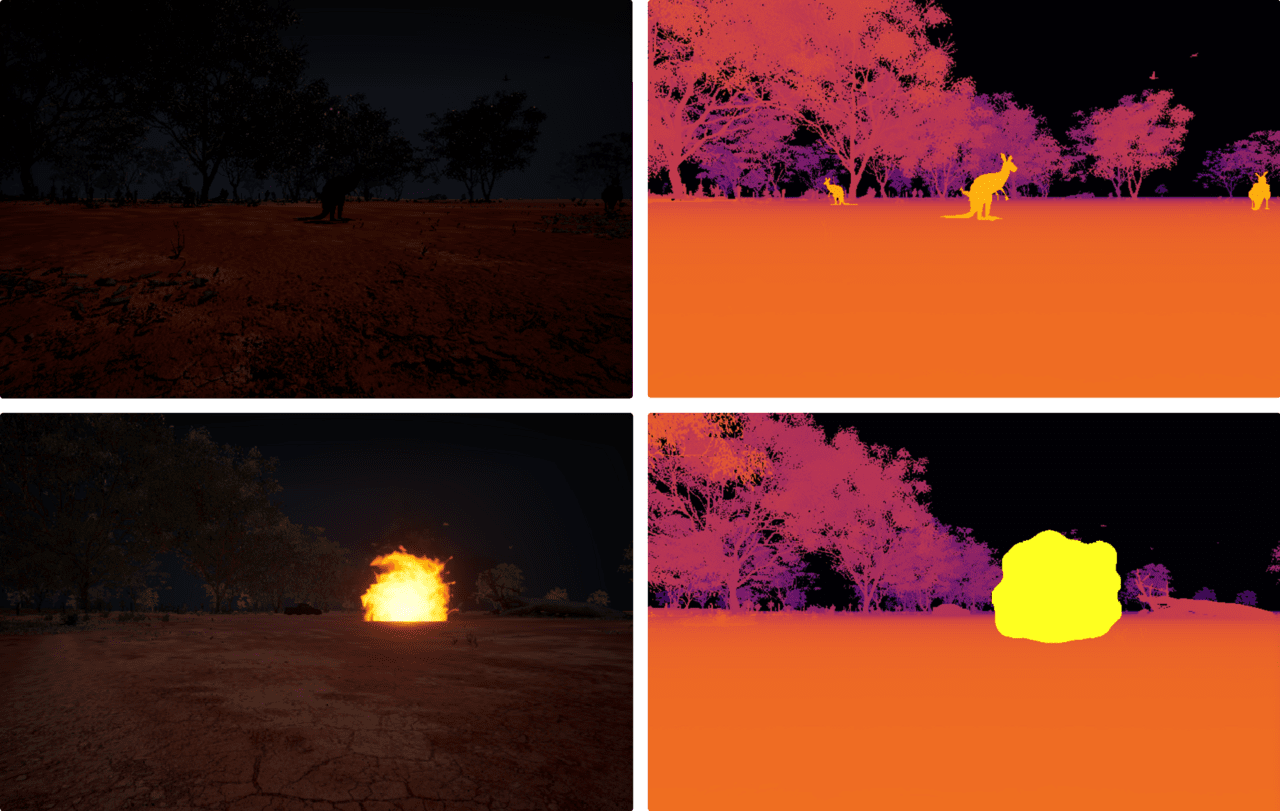
What it models
- Per-object thermal emission integrated over the LWIR band using the Planck radiation law.
- Distinct thermal signatures for warm agents (wildlife, MetaHuman pedestrians, vehicles) versus the environment.
- Pairs naturally with the dynamic phenomena (e.g. wildfire) and the night-vision camera for low-light and search-and-rescue scenarios.
Usage
The LWIR camera is exposed as camera image type ThermalIR = 11, synthesized server-side from Segmentation + DepthPlanar captures rendered in the same simGetImages batch (same frame, lockstep-safe) and captured through the same Image APIs as the RGB, depth, and segmentation streams:
responses = client.simGetImages([
    airsim.ImageRequest("front_center", airsim.ImageType.ThermalIR, False, False)
])
Object temperatures come from mesh-name keyword classification plus optional per-object Overrides in the settings file. See Synthetic IR / NVG Cameras for setup requirements, the keyword table, the settings reference, and troubleshooting (including "object not showing up"). See Sensors for the full sensor suite and the Infrared Camera page for the related inherited thermal tooling.